• Home
    • Copter
    • Plane
    • Rover
    • Sub
    • AntennaTracker
    • Mission Planner
    • APM Planner 2
    • Companion Computers
    • Developer
  • Downloads
    • Mission Planner
    • APM Planner 2
    • Advanced User Tools
    • Developer Tools
    • Firmware
  • Community
    • Support Forums
    • Facebook
    • Developer Chat (Gitter)
    • Developer Voice Chat (Mumble)
    • Developer Email (drones-discuss)
    • Commercial Support
    • Development Team
    • UAS Training Centers
  • Stores
  • SWAG
  • About
    • News
    • History
    • License
    • Trademark
    • Acknowledgments
    • Wiki Editing Guide
Servers by jDrones
Copter
  • Introducing Copter
  • AutoPilot Hardware Options
  • First Time Setup
  • First Flight
  • Advanced Configuration
  • Mission Planning
  • Logs
  • Optional Hardware
    • ADS-B Receiver
    • Battery Monitors (aka Power Modules)
    • Barometer (external)
    • Buzzer
    • Cameras & Gimbals
    • Companion Computers
    • Crop Sprayer
    • Display (Onboard)
    • ESCs and Motors
    • GPS/Compass
    • Grippers
    • Joystick or Gamepad
    • Landing Gear
    • LEDs (external)
    • Non-GPS navigation
    • On-Screen Display (OSD)
    • Optical Flow Sensor
    • Parachute
    • Power Tether
    • PPM Encoder
    • Precision Landing and Loiter (IRLock)
    • Rangefinders (Sonar, Lidar)
    • Received Signal Strength Indication (RSSI)
    • Relay Switch
    • RPM Sensor
    • Safety Switch
    • Servos
    • Telemetry Radio
      • Bluetooth
      • ESP8266 wifi telemetry
      • FlightDeck FrSky Transmitter App
      • Yaapu FrSky Telemetry Script for OpenTX
      • FrSky telemetry
        • Passthrough FrSky Telemetry
        • FlightDeck
        • Yaapu FrSky Telemetry Script for OpenTX
        • FrSky Telemetry Using Repurposed Messages
        • Repurposed Messages Scripts for Ardupilot
        • Configuration with OpenTX
        • Configuration with ErSky9x
        • MavLink to FrSky Telemetry Converters
        • Protocol Information
        • Hardware Selection Guide
        • Connecting Equipment to the SmartPort Bus
        • FrSky Telemetry Configuration in Mission Planner
        • OpenTX Scripts
        • Turnigy 9XR Pro
      • RFD900
      • Robsense SwarmLink
      • SiK Radio v2
      • UAVCast 3G/4G Cellular
      • XBee
      • Telemetry Radio Regional Regulations
      • SiK Radio configuration
      • SiK Radio advanced configuration
      • SiK Radio v1
      • Repeater for Wireless Ground Station Connections
    • Video
  • Traditional Helicopters
  • Tricopter
  • SingleCopter and CoaxCopter
  • HeliQuads
  • SkyRocket
  • Solo
  • Reference Frames
  • Use-Cases and Applications
  • Antenna Tracking
  • Simulation
  • Appendix
  • Full Table of Contents


Individual Partners SWAG Shop
 
Copter
  • Docs »
  • Optional Hardware »
  • Telemetry (landing page) »
  • FrSky Telemetry »
  • MavLink to FrSky Converters
  • Edit on GitHub

MavLink to FrSky Converters

This section contains hardware MAVLink to FrSky converter solutions.

Please feel free to add your own solutions (or ask us to).

DIY solution for the APM2.x here

APM MavLink to FrSky SmartPort Converter (Airborne Projects)

Airborne Project’s APM MavLink to FrSky SmartPort Converter converts MAVLink messages to FrSkySmartPort format. It can directly be connected to the Taranis Radio. You only have to load the Taranis telemetry modules and configure in Mission Planner. No soldering required!

https://www.airborneprojects.com/wp-content/uploads/2015/08/converter_1-500x500.jpg

AirborneProjects: APM MavLink to FrSky SmartPort Converter

The converter includes all needed cables. It features a hardware modified version of the Arduino Nano and be powered directly from the Taranis receiver.

For more information see the QuickStart Guide (www.airborneprojects.com).

APM MavLink to FrSky SmartPort Converter (MavLink_FrSkySPort)

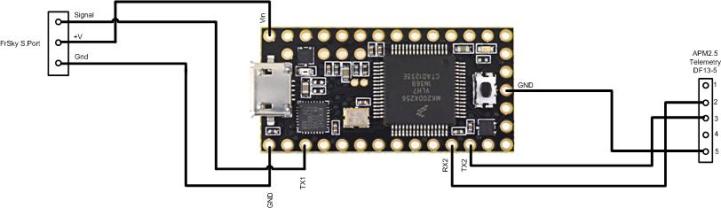
There are several open source projects such as MavLink_FrSkySPort project, the Scottflys or the Athertop project, that use the Teensy USB Development board to convert MAVLink messages to FrSkySmartPort format so that ArduPilot telemetry can be displayed on an FrSky transmitter.
https://raw.githubusercontent.com/Clooney82/MavLink_FrSkySPort/s-c-l-v-rc-opentx2.1/images/Basic%20Wiring%20-%20Teensy3.jpg

Note

This solution is one of the most versatile solutions available, and is the inspiration of many similar solutions (including Airborne’s above). It is however not a “commercial” solution and does require some soldering, but can be extended even to connect RGB Led strips like Scottflys LED Extension.

Information about the circuits and software can be found on the each project link above.

Next Previous

Questions, issues, and suggestions about this page can be raised on the forums. Issues and suggestions may be posted on the forums or the Github Issue Tracker.

Creative Commons License © Copyright 2019, ArduPilot Dev Team.