• Home
    • Copter
    • Plane
    • Rover
    • Sub
    • AntennaTracker
    • Mission Planner
    • APM Planner 2
    • Companion Computers
    • Developer
  • Downloads
    • Mission Planner
    • APM Planner 2
    • Advanced User Tools
    • Developer Tools
    • Firmware
  • Community
    • Support Forums
    • Facebook
    • Developer Chat (Gitter)
    • Developer Voice Chat (Mumble)
    • Developer Email (drones-discuss)
    • Commercial Support
    • Development Team
    • UAS Training Centers
  • Stores
  • SWAG
  • About
    • News
    • History
    • License
    • Trademark
    • Acknowledgments
    • Wiki Editing Guide
Servers by jDrones
Copter
  • Introducing Copter
  • AutoPilot Hardware Options
    • Open hardware
    • Closed hardware
      • Aerotenna Ocpoc-Zynq
      • Emlid Edge
      • Emlid NAVIO2
      • Furious FPV F-35 Lightning and Wing FC-10
      • Holybro Durandal H7
      • Holybro Kakute F4
      • Holybro Kakute F7 AIO
      • Holybro Pixhawk 4
      • Holybro Pixhawk 4 Mini
      • Mateksys F405-STD and variants
      • Mateksys F405-Wing
      • mRo ControlZero F7
      • Omnibus F4 AIO/Pro
      • OmnibusNanoV6
      • Omnibus F7V2
      • Parrot Bebop Autopilot
      • Parrot C.H.U.C.K
      • RadioLink MiniPix
        • Specifications
        • Where to Buy
        • Peripheral Connections
        • Default UART order
        • Firmware handling
      • SpeedyBee F4
      • VR Brain 5
      • VR uBrain 5.1
    • Discontinued boards
  • First Time Setup
  • First Flight
  • Advanced Configuration
  • Mission Planning
  • Logs
  • Optional Hardware
  • Traditional Helicopters
  • Tricopter
  • SingleCopter and CoaxCopter
  • HeliQuads
  • SkyRocket
  • Solo
  • Reference Frames
  • Use-Cases and Applications
  • Antenna Tracking
  • Simulation
  • Appendix
  • Full Table of Contents


Individual Partners SWAG Shop
 
Copter
  • Docs »
  • Autopilot Hardware Options »
  • RadioLink MiniPix
  • Edit on GitHub

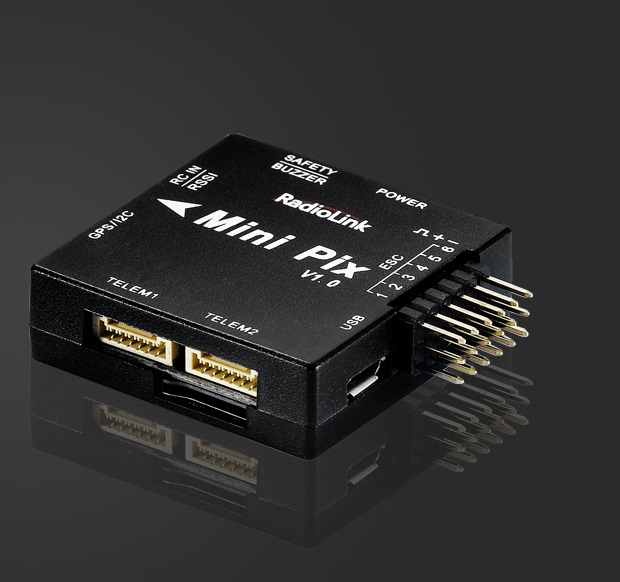
RadioLink MiniPix

../_images/minipix1.jpg

above image and some content courtesy of the RadioLink website

Specifications

  • Processor and Sensors
    • STM32F405VGT6 ARM microcontroller
    • InvenSense MPU6500
    • Compass QMC5883L
    • Barometer LPS22HB
  • Interfaces
    • 6x PWM outputs
    • 1x RC input (PWM/PPM, SBUS)
    • 3 UARTS (flow-control on Telem 1 & 2, no flow-control on GPS port)
    • external I2C
    • 2 x ADC for voltage and current sensor
    • 1 x additional ADC for analog RSSI or analog airspeed
    • SDIO microSD card slot
    • micro USB connector
    • includes buzzer / saftey-switch, power module, I2C expansion board and TS100 GPS / mag combo depending on kit features
    • size 39 x 39 x 12 mm
    • weight 12 g without wires

Where to Buy

  • RadioLink hardware is available from various warehouses like banggood.com

Peripheral Connections
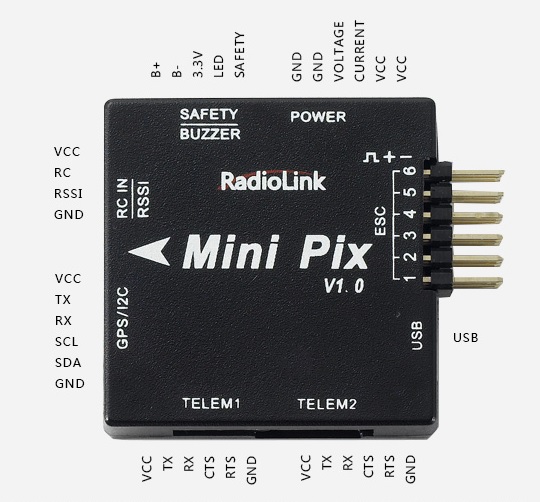
../_images/minipix_periphs.jpg

Default UART order

  • SERIAL0 = console = USB
  • SERIAL1 = Telemetry1 = USART3
  • SERIAL2 = Telemetry2 = USART2 (see Notes for reversed plastic case labels!)
  • SERIAL3 = GPS1 = UART4

Serial protocols can be adjusted to personal preferences.

Firmware handling

This hardware comes preflashed with a RadioLink-branded version of ArduCopter and an ArduPilot-compatible bootloader. To use non-branded ChibiOS-based ArduPilot firmware versions, download the required vehicle firmware .apj file from http://firmware.ardupilot.org/ and flash your board using MissionPlanner’s “custom firmware” option.

In case a bootloader re-installation is required, you can boot your board to DFU-mode using the following solder-points:
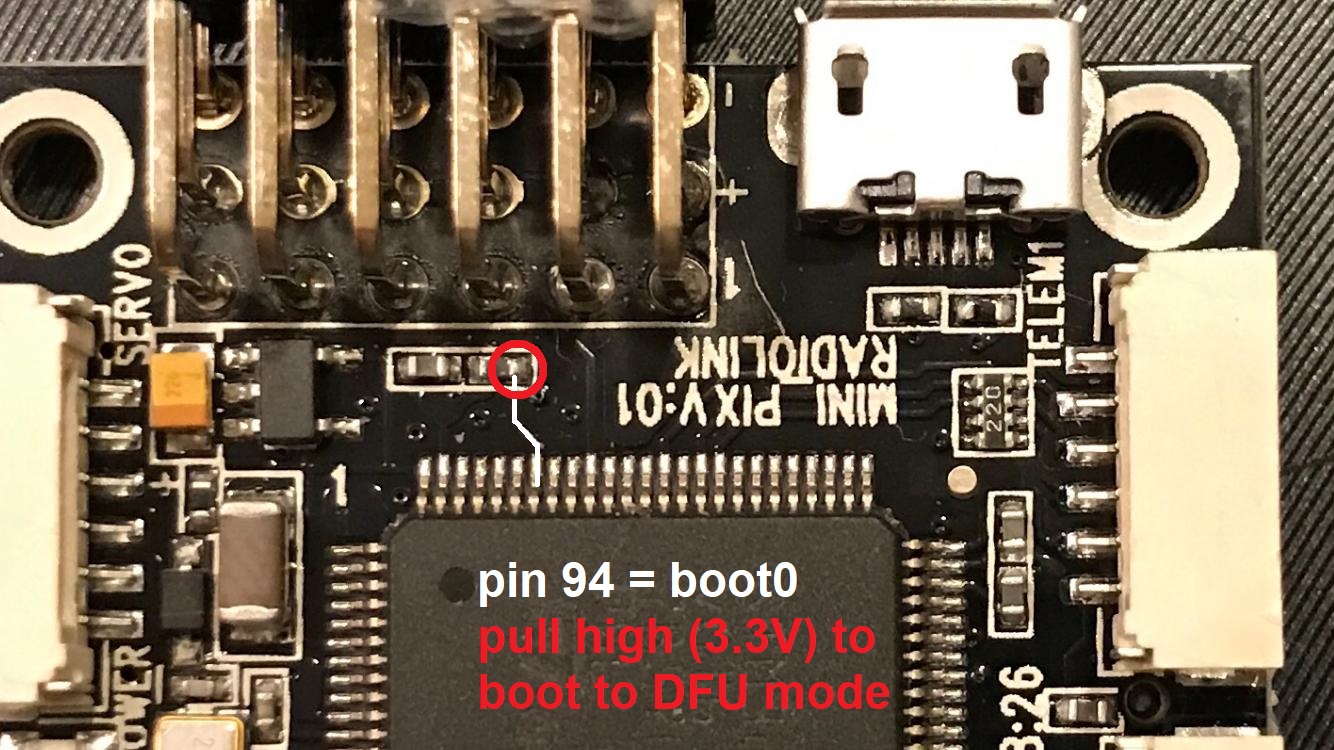
../_images/minipix_dfu.jpg

Then follow the instructions on how to load firmare onto ChibiOS boards.

Warning

The flightcontroller’s plastic case shows the telemetry ports’ numbers reversed compared to the board’s PCB imprints and the firmware’s SERIALn assignments, this requires additional attention!

Note

MiniPix voltage and current sensing pins use Pixhawk standard (VOLT_PIN = 2, CURR_PIN = 3). The additional ADC pin can be used for either RSSI or analog airspeed. Set required option to PIN = 11.

Next Previous

Questions, issues, and suggestions about this page can be raised on the forums. Issues and suggestions may be posted on the forums or the Github Issue Tracker.

Creative Commons License © Copyright 2019, ArduPilot Dev Team.